Accio: Alibaba AI Agent
- 4.7
- Rating
- 5.00M
- Installs
- Free
- Price

 Analysis by App-foxy
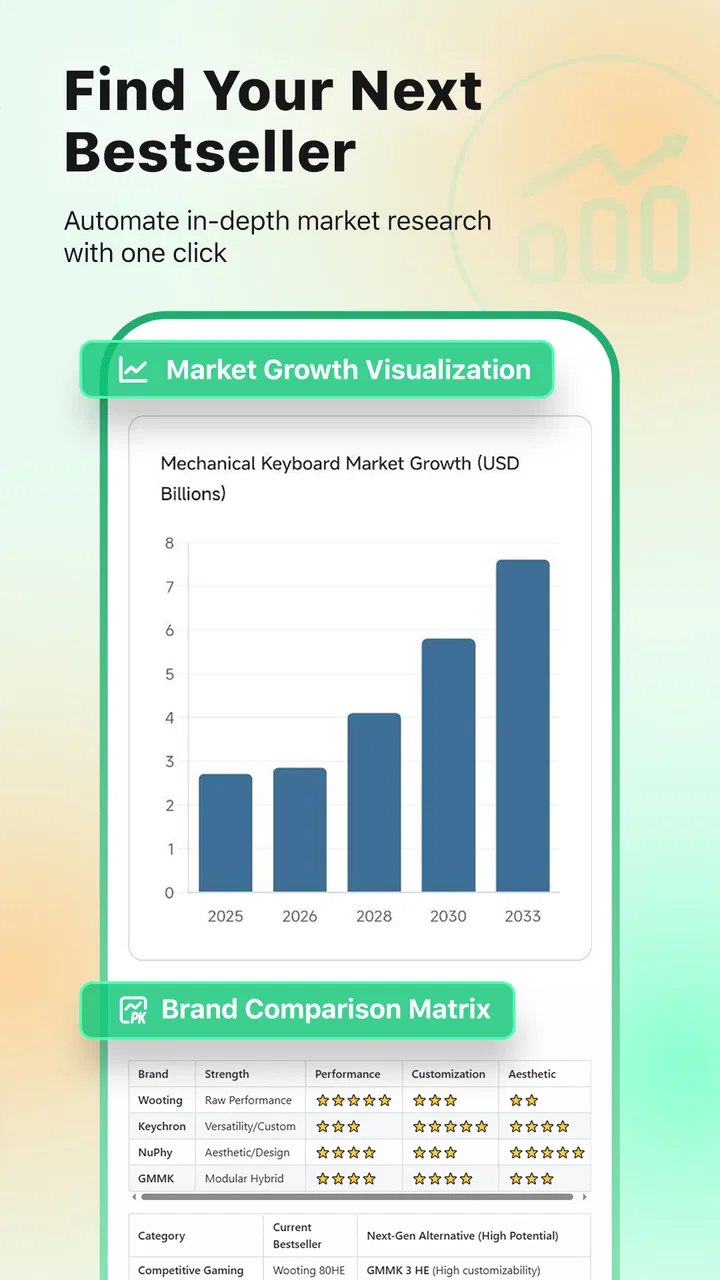
I approached Accio: Alibaba AI Agent as a practical productivity tool rather than as another shopping app. Its purpose is to help people design product ideas, notice market trends, and look for wholesale suppliers, so the real question is not whether it can replace every business tool, but whether it makes early product research easier to manage. After spending time with it, I found the most interesting part was the way it brings several research jobs into one place. That can be useful when I am still shaping an idea and do not yet know which suppliers, styles, or product details deserve attention.
The app is free to start, and it comes from Accio.com. It has reached more than five million installs and holds a 4.6 average from roughly sixteen thousand ratings, which suggests that many people find the basic concept worthwhile. It is listed for Teen users, runs on Android 6.0 and later, and the current version is 1.24.1. I would still treat those figures as background rather than proof that the app will suit every person. A high rating cannot tell me whether the interface is comfortable for someone with low vision, limited dexterity, attention difficulties, or an unreliable connection.
How readable and navigable the research experience feels
The strongest part of the experience is the focus on moving from a vague product thought toward something more concrete. Instead of beginning with a long list of supplier pages, I can start by considering the kind of item I want to develop or source. That shift matters for beginners. A person who has never worked with wholesale marketplaces may not know which search terms describe a product accurately, while someone with experience may appreciate a faster way to compare directions before contacting suppliers.
You May Also Like

 Blood Strike: 2.5 Anniversary
Blood Strike’s Loadouts Turn Every Drop Into a Tactical Gamble
A close look at Blood Strike’s custom loadouts: how fast access to signature weapons reshapes its battle royale rhythm, rewards preparation, and narrows the gap between fights.

 Pandora - Music & Podcasts
Pandora’s Music Is Easy to Start, but Harder to Recover
Pandora’s strength is its low-effort path from a seed to a station. Its weak spot is how much confidence it asks you to place in connection, setup, and quiet recovery.

 8 Ball Pool
 Is Built on Rivalries, Rematches, and Routine
A close look at the rivalries, rematches, shared routines, and unanswered safety questions that turn a quick pool match into a persistent mobile community.

 Samsung Music
’s Quiet Strength Is Playing What You Already Own
Its reach comes less from spectacle than from dependable access to a personal library. That simplicity is both the app’s strongest retention engine and its ceiling.

 AccuWeather: Weather Radar
AccuWeather Review: A Quick, Clear Forecast for Everyday Decisions
For everyday plans, the best forecast is the one you can understand quickly. AccuWeather makes rain timing, radar, and local conditions easy to act on, with a few trade-offs.

 Hill Climb Racing
Why Hill Climb Racing Still Turns Crashes Into One More Run
A tiny car, a bumpy hill and one more upgrade: Hill Climb Racing keeps resurfacing because its simple chaos makes every near-miss feel personal.
More From Our News Desk



I found that this kind of workflow is easier to understand when I treat each search as a question. For example, rather than entering a broad phrase and accepting the first attractive result, I would ask what materials, audience, use case, or design detail I am actually investigating. This makes the app more useful as a thinking aid. It also reduces the risk of confusing a visually appealing product with one that matches my intended market.
That said, an AI-assisted research tool can feel less predictable than a conventional catalog. A standard marketplace usually teaches me where filters, categories, and sorting controls are located. An agent-style experience is more conversational and exploratory, which is helpful when I am unsure what to search for, but less comfortable when I want a precise, repeatable route through the same information. I recommend keeping a simple note of the search terms and decisions that produced useful results. That habit makes later comparisons much easier.
For readers who rely on larger text, strong contrast, screen magnification, or a simplified visual field, the practical test is whether the important content remains understandable after the display is adjusted. Product research can contain dense names, specifications, supplier details, and visual results. I would not judge the app only by its first screen; I would check the full path from discovery to comparison. If labels become cramped or important differences are communicated mainly through small visual changes, the experience may demand more effort than expected.
Navigation also depends on how much context the user must remember. When several product ideas are being explored at once, it is easy to lose track of why a result looked promising. I get better results by working in short sessions: one product type, one audience, and one research goal at a time. That is not merely an organizational tip. It helps people with attention or memory challenges avoid turning a useful discovery tool into an overwhelming stream of possibilities.
Why the visual side needs a deliberate approach
Product discovery is naturally visual, but visual richness is not the same as visual clarity. Images can quickly reveal a shape, color direction, or packaging idea, yet they do not answer every practical question. I use images to shortlist concepts, then slow down and inspect the written information before treating anything as a serious lead. This is particularly important for users who process information better through text than pictures, or who need extra time to interpret crowded result screens.
For someone with dyslexia or another reading difficulty, I would keep searches specific and avoid copying long blocks of generated wording into a final brief without editing. Short notes such as “reusable travel item, neutral colors, compact packaging” are easier to review than an unstructured paragraph. The app can support exploration, but I still need to turn its output into a clean, human-readable plan.
The same advice helps users who are working in a second language. Wholesale terminology can be ambiguous, and an appealing translation may not describe the exact product standard I need. I would verify important terms independently before discussing samples, materials, quantities, or customization. The app is most valuable at the discovery stage; it should not be the only source for a decision that affects money or a customer promise.
Motor, sensory, and situational access in everyday use
On a phone, product research often involves repeated tapping, scrolling, text entry, and switching attention between images and descriptions. That routine may be comfortable for a user with steady hand control, but tiring for someone with tremors, joint pain, limited reach, or fatigue. My practical recommendation is to use the app in shorter bursts and prepare search phrases before opening it. Fewer corrections and less repeated typing can make the session noticeably easier.
People with limited dexterity may also prefer doing the exploratory part when seated and unhurried, rather than trying to research while commuting or carrying something. This is one of the app’s important situational limitations: a mobile format is convenient, but convenience does not automatically mean low effort. A phone screen gives less room for comparing several supplier possibilities than a larger display, so users who need generous spacing or a stable visual layout may find a tablet or desktop browser more comfortable for the later review stage.
For blind or low-vision users, the key issue is whether the essential product information is available in a form their assistive technology can interpret, rather than being communicated only through images or visual placement. I would test the main tasks directly with the accessibility tools already used on the device: starting a search, reading a result, understanding supplier information, and returning to an earlier idea. If one of those steps depends heavily on unlabeled controls or image-only context, the app may be better used with assistance or alongside another research method.
Users with hearing loss are less likely to be affected by a text-centered research workflow than by any optional audio or video material they encounter during product investigation. I would not assume that visual content explains every detail. When a product presentation depends on motion, spoken explanation, or a demonstration, looking for an equivalent written description is the safer approach before making a shortlist.
Sensory sensitivity deserves attention too. Product discovery can produce a rapid succession of colors, images, suggestions, and new directions. That can feel energizing to one person and exhausting to another. I get a calmer experience by setting a narrow goal before searching and stopping once I have a small group of plausible candidates. The app becomes much easier to use when I resist the temptation to treat every new idea as something that must be investigated immediately.
A realistic use case for a small seller
Imagine I want to develop a compact desk accessory for people who work from home. I could begin with a plain description of the intended user and the problem the item should solve, then use the app to explore different product forms and supplier directions. Instead of asking only for “desk accessories,” I would refine the search around size, storage, material preference, and the visual style I want to test. I would save the most relevant findings in an external note, separating design inspiration from actual supplier leads.
The inclusive benefit of this workflow is that it breaks a large task into smaller decisions. A user who becomes overwhelmed by open-ended research can handle one question at a time. Someone with limited energy can pause after identifying design directions and continue later. A person who communicates more comfortably through written prompts can prepare their wording in advance. However, the app does not remove the need to evaluate supplier reliability, product quality, shipping arrangements, or commercial terms. Those steps still require patience and, in some cases, help from another person.
For a small business owner, the most useful trade-off is speed versus verification. The app can help me reach relevant possibilities faster than starting from a completely blank search page. It cannot turn an attractive possibility into a dependable business decision by itself. I would use it to build a shortlist, then compare the same requirements across suppliers and record unanswered questions before contacting anyone.
Where it fits beside ordinary productivity and shopping tools
Compared with a conventional wholesale marketplace, this app feels more helpful at the beginning of the process. A traditional marketplace is often better once I know the exact product, specifications, and supplier criteria I want to compare. Its structured filters can make repeat purchasing more predictable. Accio is more appealing when the problem is still fuzzy and I need help turning a broad idea into possible product directions.
Compared with a general notes app, it offers a more specialized starting point for product research. A notes app is better for organizing interviews, costs, supplier replies, and a final decision log because I control the structure. I would not use this app as my only project record. Keeping a separate document for requirements, questions, and rejected options prevents interesting discoveries from becoming a disorganized pile.
Compared with a generic web search, the app has a clearer commercial purpose. That focus can save time when I am looking for wholesale possibilities rather than general information. The compromise is that a broad search engine may be better for checking independent reviews, regulations, material safety, market context, or customer complaints. I would use both: the app for discovery and a wider set of sources for due diligence.
Compared with a design application, it is not the place I would expect to finish a polished product concept. Its value is in exploring directions and finding relevant supply paths. A dedicated design tool remains the better choice for precise dimensions, production-ready drawings, brand assets, and controlled revisions. This distinction helps prevent disappointment: the app can support the early creative and sourcing stages without replacing specialized software.
There is also a financial point worth considering. The app is free, but in-app purchases range from $8.99 to $799.99 per item. That wide range means I would avoid assuming that every useful workflow is included at no cost. Before paying, I would identify the exact task I need to improve and decide whether the expected time saved justifies the expense. For casual browsing, the free starting point may be enough. For a business workflow, I would want a clear reason before committing to any purchase.
Remaining barriers and how I would work around them
The first barrier is cognitive rather than technical: product research can create too many possibilities. An AI agent may make exploration feel effortless, but effortless exploration can still produce decision fatigue. My workaround is to define rejection rules early. If a product does not fit the intended customer, target price, size, or material direction, I remove it instead of continuing to collect ideas.
The second barrier is confidence. A polished result can feel more authoritative than it deserves. I treat every suggestion as a lead, not a conclusion. For important choices, I would ask whether the information is specific enough to support an order, whether the supplier details are consistent, and what still needs confirmation. This approach is especially important for users who may find dense commercial language difficult to interpret or who are working with a support person.
The third barrier is continuity across devices and contexts. A phone is excellent for capturing an idea while it is fresh, but a larger screen may be better for comparing several options and writing a detailed brief. I would plan the workflow around that difference instead of forcing every task onto the smallest screen. Capture quickly on mobile, organize carefully elsewhere, and keep the final requirements in a document that is easy to revisit.
There is also a risk of confusing inspiration with evidence. Trend discovery can be valuable, but a trend is not automatically a stable market opportunity. I would compare any promising direction with real customer needs and practical production constraints. For users with limited time, this may feel like extra work, but it is the step that protects the research from becoming visually exciting yet commercially weak.
People who need highly predictable interfaces may prefer a conventional catalog or spreadsheet for the final stages. Someone who dislikes open-ended prompts, needs exact filtering, or mainly wants to reorder a known product may find the agent approach unnecessary. Likewise, users who are uncomfortable with commercial research or who need a fully guided procurement process should not expect the app to make every judgment for them.
My inclusive verdict after using it
I see Accio: Alibaba AI Agent as a useful starting point for people who want to turn product ideas into organized research. Its best quality is not simply that it can surface supplier possibilities; it is that it encourages a more guided path from vague concept to shortlist. That makes it particularly interesting for first-time sellers, independent designers, small teams, and anyone who finds a blank marketplace search intimidating.
Its accessibility in everyday life depends heavily on how the user works. People who benefit from written prompts, short research sessions, and a clear one-question-at-a-time process may find it approachable. Users with motor limitations can reduce strain by preparing searches and avoiding long mobile sessions. Users with visual, reading, or sensory needs should test the full research path with their preferred device settings and should not rely on product imagery alone.
I would recommend it to a friend who is exploring a product line and wants help getting past the first stage of uncertainty. I would pair it with a notes system, a larger-screen review method when possible, and independent checks before spending money or making supplier commitments. That combination gives the app room to do what it does well without asking it to become a design suite, procurement manager, accessibility solution, or final source of truth.
The Teen content rating makes it broadly suitable for older teenagers and adults interested in product ideas or entrepreneurship, while the free entry point lowers the barrier to trying the workflow. Still, the possible in-app purchase costs mean I would review any payment decision carefully. My final view is positive but measured: this is a discovery and sourcing companion, not a complete business operation. If you approach it with a focused question, keep your own records, and verify important details, it can make early wholesale research more manageable and more inclusive across different abilities and working situations.
FAQs for Accio: Alibaba AI Agent
01What is Accio: Alibaba AI Agent and what does it do?
Accio is an AI-powered assistant developed by Alibaba that uses advanced machine learning algorithms to provide users with intelligent solutions. The app can perform a variety of tasks, including personal assistance, recommendation services, and information retrieval, making it a versatile tool for both personal and professional use.
02Is Accio: Alibaba AI Agent available on both Android and iOS platforms?
Yes, Accio is available for download on both Android and iOS platforms. Users can easily find the app in the Google Play Store and the Apple App Store, ensuring compatibility with a wide range of devices. This cross-platform availability makes it accessible to a larger audience.
03How does Accio ensure user data privacy and security?
Accio employs robust data encryption and strict privacy protocols to ensure that user data is secure and confidential. The app complies with international data protection regulations, and users have control over their data, including options to manage and delete information as needed.
04What are the main features of Accio: Alibaba AI Agent?
Accio offers a comprehensive suite of features, including voice recognition, personalized recommendations, task automation, and integration with other Alibaba services. The app is designed to enhance productivity and simplify daily tasks through its intuitive interface and powerful AI capabilities.
05Can Accio be integrated with other apps and services?
Yes, Accio is designed to seamlessly integrate with a range of other applications and services, including Alibaba's ecosystem. This connectivity allows users to streamline workflows and improve efficiency by connecting Accio with tools they already use, enhancing its overall functionality.
Pros
- User-friendly interface for easy navigation.
- Offers accurate AI-powered search results.
- Supports multiple languages efficiently.
- Integrates seamlessly with Alibaba services.
- Quick setup with minimal configuration required.
Cons
- Limited offline functionality available.
- Requires a stable internet connection.
- Occasional minor bugs in search results.
- No dark mode for night-time use.
- Limited customization options for users.

Accio: Alibaba AI Agent
Gallery